10. Solving Second Order DEs Using Scientific Notebook
We have powerful tools like Scientific Notebook, Mathcad, Matlab and Maple that will very easily solve differential equations for us. What is important is that we know what to tell the computer to do (that is, we need to set up the equations properly and to know how to input them), and to know what our result means (and also to be able to check our solution).
Let's leave to machines what they are good at (calculation) and let the humans do what they are good at (the thinking, the understanding and the problem solving).
So this section contains an example showing how to solve it .
Example
Use a computer algebra system to solve the DE
`(d^2y)/(dt^2)+2(dy)/(dt)+5y=t^2`
given that at `t=0`, `y=0` and `(dy)/(dt)=5`.
Method 1: Wolfram|Alpha
Using the (free) Wolfram|Alpha, we enter the question details as follows:
solve y''+2y' + 5y = t^2, y(0)=0, y'(0)=5
Method 2: Scientific Notebook
Using Scientific Notebook, we proceed as follows:
a. Set up a matrix with 3 rows and 1 column.
b. In the first row of the matrix, put: `(d^2y)/(dt^2)+2(dy)/(dt)+5y=t^2`
c. In the second row of the matrix, put the first initial condition: `y(0) = 0`
d. In the third row of the matrix, put the second initial condition: `y'(0) = 5`
e. Go to Compute menu and choose Solve ODE then Exact.
NOTE: You can also choose Laplace to see what happens.
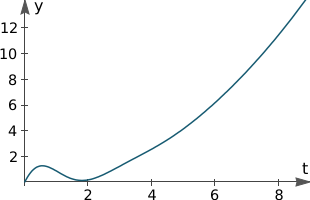
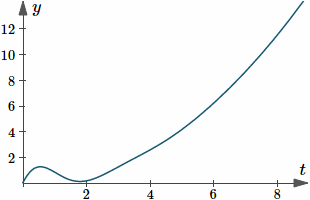
f. Graph your solution for `0 < t < 9`. If you have done everything correctly, it should look like this:
Solution
Either of the software approaches gives us this solution:
`y(t)=1/250 (2 (25 t^2-20 t-2)+` `{:e^(-t)(647 sin 2t + 4 cos 2t))`
Graph of `y(t)=1/250 (2 (25 t^2-20 t-2)+` `{:e^(-t)(647 sin 2t + 4 cos 2t))`.
After the initial sinusoidal "blip", the graph becomes parabolic for `x > 2`.