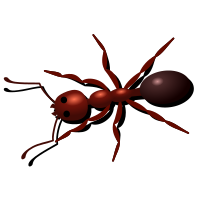
Vector Art

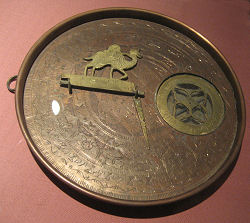
Astrolabe, Dubai Museum
A photograph that you take with your digital camera is made up of thousands of pixels (picture elements), each one a different color. Such photos are called raster images. Another name given to raster images is bitmap, which means every pixel (or "bit") has information associated with it, like color and brightness.
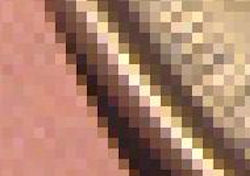
The big problem with raster images is that if you want to enlarge the image, it ends up looking all blotchy, like we see below.

Detail of astrolabe image
The edges are what we call "pixelated" and they are not attractive at all.
Mathematics to the Rescue - Vector Images
A vector image is made up of points, lines and curves that are defined by mathematical equations. Vector images have several advantages over raster images, the most important being better image quality and also reduced file size.
You can produce vector art in an image editing software application like Adobe's Photoshop, Illustrator or Corel's PaintshopPro. Other packages that use vector art include Flash and Inkscape (free and open source).
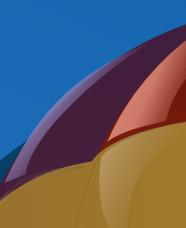
The following 3 screen shots are from a vector image of a hot air balloon. The digital artist has traced the outlines of the balloon from a photograph and then colored the sections of the balloon using vector-based information.
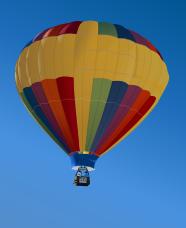
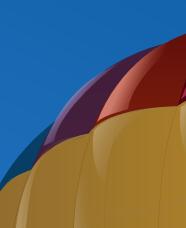
As you can see, when you zoom in on the balloon vector image, there is no ugly pixelation - the image "behaves" well under any level of magnification.
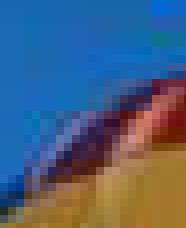
If it was a raster image and we zoomed in, then the 3rd image above at the same magnification would actually look quite ugly, like this:
File size advantage of vector graphics
Maybe you know that your digital photos take up a lot of memory on your camera or computer hard drive. If you reduce the size of the image, then the file size is also less.
On the other hand, vector images have the same small file size no matter what the image size is. This is because the image is being stored as a series of lines and curves, In the case of raster images, every pixel needs to be stored and this is inefficient.
What is the Mathematics in Vector Art?
Vector art consists of a combination of the following basic mathematical shapes, called primitives.
Straight lines
We learned before that straight lines can be written in the form
y = mx + b
(See more on Straight Lines)
For example, we would join the points (1, 4) and (-3, 12) with the straight line y = -2x + 6
To obtain this curve, I used the formula
y − y1 = m(x − x1)
Polygons
A polygon is a many sided figure. The simplest 2-dimensional polygon is the triangle. Here are the first 5 regular polygons (triangle, square, pentagon, hexagon, heptagon).
Of course, we could also have irregular polygons:

Circle

The circle is also a common shape used in vector graphics. A circle with radius r has equation:
x2 + y2 = r2
See The Circle for more information.
Ellipse

We also can use of the ellipse in vector art. An ellipse with major axis a and minor axis b (assuming the ellipse is longer horizontally) has equation:
For more background on this, see The Ellipse.
Bezier Curves
Bezier Curves are drawn connecting 2 or more points. We can have:
a. Linear Bezier Curves: This is simply a straight line passing through 2 points.
b. Quadratic Bezier Curves: We wish to draw a parabola (or quadratic Bezier curve) through 3 given points (1, 2), (3, 5) and (5, 4) as follows
To find the required quadratic, we use the general form of the quadratic and substitute the known values of x and y. (See background on this at The Parabola.)
y = ax2 + bx + c
Substituting our 3 points gives us:
2 = a + b + c
5 = 9a + 3b + c
4 = 25a + 5b + c
Now we have 3 equations in 3 unknowns, which we can solve using matrices or linear methods. (See Matrices.)
After some algebra, we find that the equation of the required curve is:
And here is the graph of the required quadratic curve, passing through the 3 given points:

c. Cubic Bezier Curves: We can find a cubic curve passing through 4 given points using the same process that we just did for the quadratic curve above.
For example, if I use the same 3 points (1, 2), (3, 5) and (5, 4) as I did for the above example and then add a 4th point (6, 10), to find the cubic curve passing through these 4 points I need to set up a set of 4 questions in 4 unknowns, using the general cubic:
y = ax3 + bx2 + cx + d
Solving those resulting 4 simultaneous equations for a, b, c, d gives me the following cubic curve passing through the 4 points:
Here is the resulting curve passing through the 4 given points:
Drawing Bezier Curves in a Graphics Program
When you use a graphics program to draw Bezier curves, it does all the required mathematics for you in the background.
In the example on the right, I have created 3 vector arrows, which in this case are curves passing through 2 points. In the 3rd one, you can see how it is looks during the creation process. I can drag the handles into whatever curve shape I desire.
Later, I can edit the shape of the arrow or resize the vector and there will be no loss of quality. This is very difficult to do with a raster image - you would need to start again and draw the whole thing.
Resources
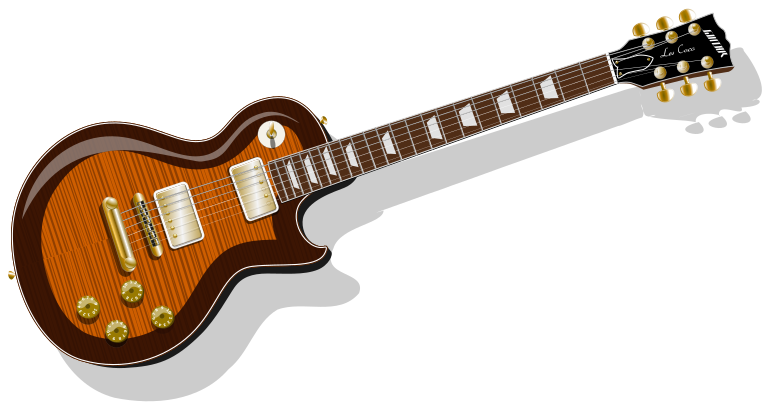
Here are some good free vector graphics.: Vectorart.org, Openclipart.org.
Go here for some excellent Photorealistic Vector Art.
There are lots of examples of vector art at lines and colors.
More Vector Art Examples


Sources: Vectorart.org, Openclipart.org.
Sign up for the free IntMath Newsletter. Get math study tips, information, news and updates each fortnight. Join thousands of satisfied students, teachers and parents!
Recommended Math DVDs
Easy to understand math lessons on DVD.
Broad range of math topics. Try before you commit.
MathTutorDVD.com
Book mark this page in Del.icio.us, Furl, Digg, StumbleUpon, whatever...
Didn't find what you are looking for? Try search:
Need a break? Play a math game. Well, they all involve math... No, really!